When I started making comics in Krita, the drawing held up, but the rest of the page did not. The screentone had no real LPI, the speech balloon came from a file I had copied years earlier, and the pose reference lived in a separate program. Every step needed a workaround.
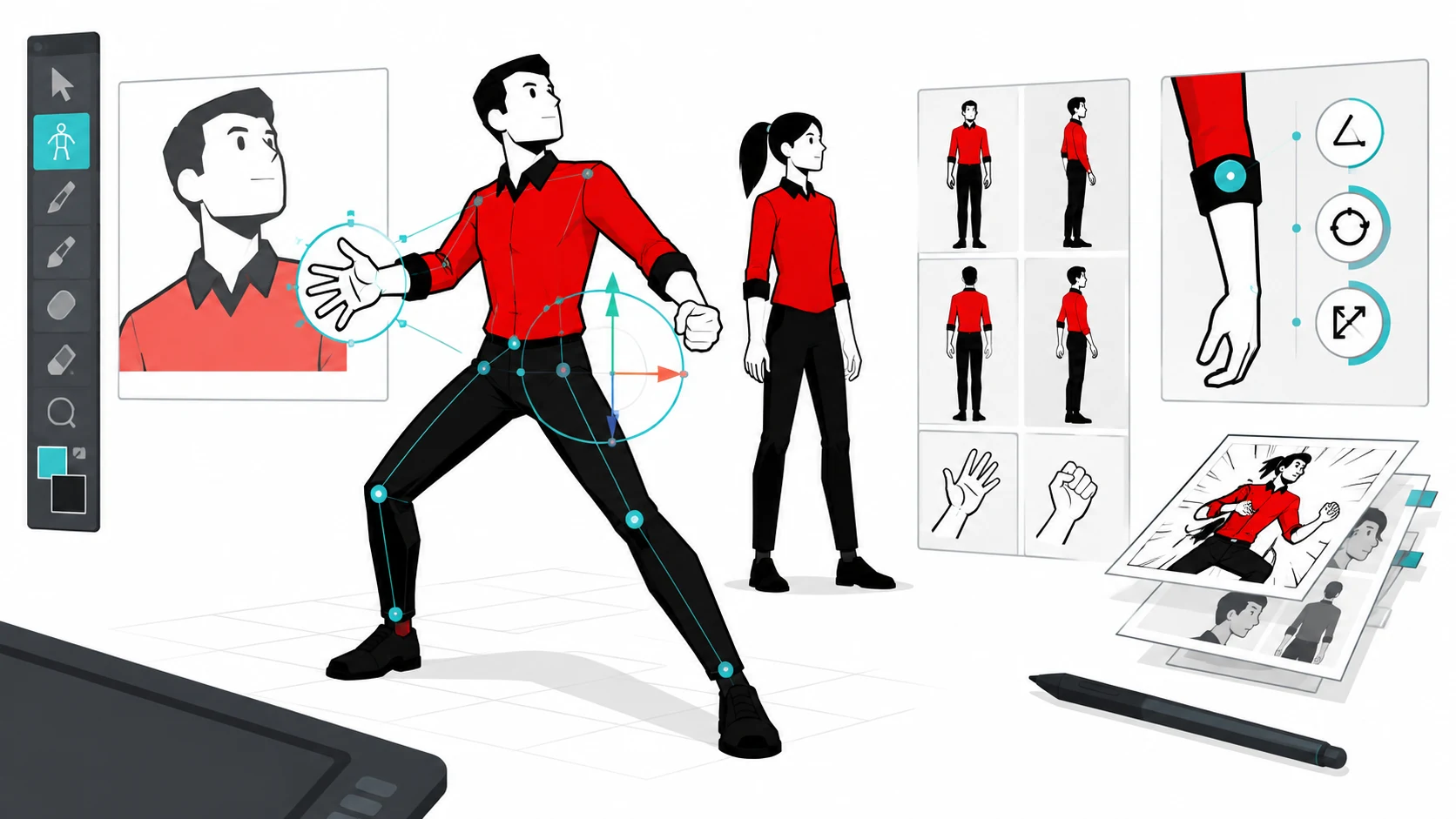
I built HQ Tools to close that gap. It is a free plugin for Krita that gathers, in its own panels, what a comic artist uses between the rough sketch and the final page. Version 0.7.0, out today, brings the most requested module since the start: a poseable 3D mannequin inside Krita.
What the plugin brings together
There are eight modules, which you turn on or off per project:
- Screentones and hatching. Presets with real LPI, the cell calculated from the document DPI and applied as a non-destructive fill layer. There is halftone as a filter mask over painted tone, and CMYK per-channel halftone, with print angles.
- Balloons. A catalog of vector SVG speech balloons, with the set I drew by hand, inserted into the active group, plus a text layer option.
- Onomatopoeia. Sound effects in SVG, ready to place as vectors.
- Project library. Create your own HQ resources (balloons, panels, onomatopoeia) inside Krita, on a 15 × 15 cm canvas at 300 dpi, saved as SVG (vector) or transparent PNG (painting).
- Palettes. Comics and artistic templates (tones, ink, skin, sky, foliage, Zorn, manga, superhero, among others), applied to the foreground and background color.
- Pages. A manager with thumbnails of
.krafiles, creation of the next page (A4, A5, A3, strip, American, tankobon) with automatic margin guides, and page templates. - Brushes. Brush sets installed in Krita (Sketch, Inking, Watercolor, Acrylic, Screentones), with slots and shortcuts, plus community packs with verified licenses.
- 3D viewer. The new module that opens version 0.7.0.
A 3D mannequin inside Krita
Reference poses were always the odd one out: either you draw from memory, or you leave Krita to open another program. The viewer brings the mannequin into the plugin.
You pick the body (Man or Woman), apply a pose from the library (for now Idle with open hands and Idle with closed hands), click a body region (head, torso, arm, leg) and that joint’s sliders appear: Bend, Open and Twist. Drag to orbit; the mouse wheel zooms; Shift + drag pans.
For tracing, there are three styles: Shaded, Silhouette and Contour, the last one keeping the silhouette line with hidden lines removed. Insertion is raster at document resolution, as a normal layer or as a locked reference at reduced opacity.
Inside, with no Blender running
It is a low-poly mesh (MakeHuman, CC0) with an Auto-Rig Pro rig, 68 bones and about 1,600 vertices. Instead of opening Blender every time, the FBX file becomes JSON through an export script, and the plugin core reads that JSON in pure Python, no numpy.
That is how a 3D viewer fit inside a plugin, without becoming a separate program. I checked the math against Blender itself: a vertex tested at the same rotations matched to four decimal places, and extracting the animated poses stayed within 7 mm of deviation.
The tool follows your method
Researcher Margarita Molina Fernández describes digital comics as a hybrid medium, with no fixed form, where each author has to design their own methodology and format.[1] The move from paper to screen also invites new resources and tools.[2]
If the method is yours, it makes sense for the tool to adapt to it, not the other way around. That was the rule for building HQ Tools: each module solves a step I already did, without forcing me to change how I draw.
What is still being tested
Newest of all, the 3D viewer still has limits. The pose library ships two resting positions, and chaining more complex poses comes later. Migrating to Krita 6 (Qt6) is also on the horizon. I would rather say this than sell the plugin as ready for everything.
Everything else (screentones, balloons, palettes, pages, brushes) already runs in my daily work. If you want to see the plugin in a comic workflow, I wrote about storyboard language and documented the free pipeline I use in production.
How to install
- Download the ZIP from the releases page.
- Import it in Tools > Scripts > Import Python Plugin.
- Enable it in Configure Krita > Python Plugin Manager and restart Krita.
It is open code, under the MIT license. If you find a problem, the repository’s Issues tab is the right place.
Frequently asked questions
Is HQ Tools free?
Yes. It is free software, under the MIT license. You download the ZIP, install it in Krita and use it at no cost.
Which version of Krita does the plugin work with?
The target is Krita 5.3.4. Migration to Krita 6 (Qt6) is planned for later.
Do I need Blender to use the 3D viewer?
No. The model is exported once and read by the plugin in pure Python. Blender does not run during use.
Does HQ Tools work for print and digital comics?
It works for both. The screentones, balloons and 3D mannequin help on the printed page as much as on screen.
How do I suggest a feature or report a bug?
The GitHub repository takes suggestions and reports through the Issues tab.
HQ Tools is free and open. If you make comics in Krita, download version 0.7.0 and see whether it fits your process.
— Ricardo A. B. Graça · ricolandia.com
References
- Molina Fernández, M. (2023). Understanding digital comics for creation: From conception to reception. Studies in Comics, 14(1), 63–77. https://doi.org/10.1386/stic_00099_1
- Goodbrey, D. M. (2013). Digital comics – new tools and tropes. Studies in Comics, 4(1), 185–197. https://doi.org/10.1386/stic.4.1.185_1