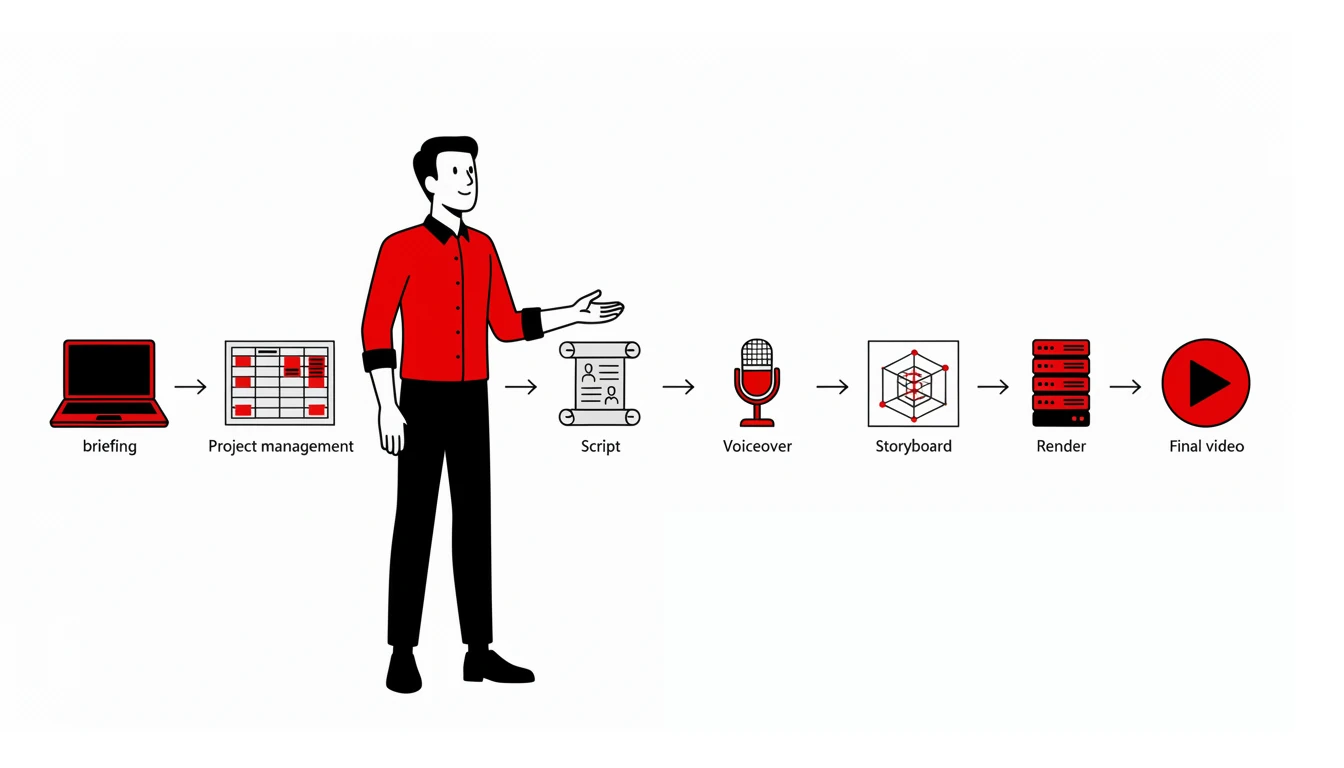
If you’re hiring for animation, one question worth asking the producer is: what does your pipeline look like? The answer reveals whether the budget goes to software licenses or to actual animation hours. Here are the 10 stages of mine — from briefing to 4K render, all on free software and self-hosted infrastructure, with the conscious exceptions I make.
1. Briefing
Every briefing meeting — audience, product, channel, offer, campaign duration, campaign phase, rhetorical structure, CTA — is organized in TriliumNext, self-hosted and synced across all my devices. No notes scattered between apps, email and spreadsheets: a single knowledge repository, under my control, with the full project history from the first conversation.
2. Project management
Project organization for the team runs on Kanboard, customized and self-hosted locally. External access (for clients to follow along or remote collaborators to log in) is handled via Headscale — the open-source implementation of the Tailscale protocol — with the Tailscale client as the endpoint. It’s my own private network, without depending on a commercial VPN provider for the backbone.
3. Technical script
No generic AI-generated scripts. The technical script — with rhetorical structure, timing and scene direction — is written in Markdown, right inside TriliumNext, and exported to .odt. From there, I use LibreOffice for review and conversion to PDF or DOCX, whichever the client needs. Every piece of text starts in an open format and only becomes proprietary at the very end, if required.
4. Storyboard
The storyboard is built with the actual final scene layouts — color, font and form aligned to the brand guidelines, not a pencil sketch. Scene layouts are constructed in Inkscape and Blender, depending on the type of animation and scene (in many projects, scenes are split between the two). The final storyboard pages are assembled in Inkscape.
5. Voiceover and soundtrack
This is the stage where I openly acknowledge an exception to “all free and all local”: for real voiceover, I use platforms like Fiverr and Upwork — because hiring a professional voice actor is still, for now, the best way to guarantee human voice quality. For synthetic voice, I run Chatterbox locally, using my own voice as a guide and voice changer — the quality is already on par with ElevenLabs, but running on my own server, without sending audio to any third-party cloud.
6. Animatic
The animatic is assembled in Blender, Kdenlive or DaVinci Resolve, depending on the project type and required output. I use audio monitor plugins in Blender to keep audio sync during this stage. Worth noting: DaVinci Resolve, even the free version, is proprietary software — it enters the pipeline when its specific feature set justifies the deviation.
7. Animation
Both 2D and 3D animation are done in Blender. It’s the central tool of the pipeline — which greatly simplifies the workflow between stages, since most of the process (storyboard, animatic, animation and editing) communicates within the same software.
This approach isn’t unique to me. It’s the same path professional animation studios have been following for years. The Blender Studio publicly documents that it builds its pipeline entirely on free software, with Blender as the sole tool for final visual content — designed to enable small production teams of 10 to 20 people. Cube Creative, a French animation studio, migrated its entire pipeline to Blender and reports that it now barely exchanges data with other DCC tools, simplifying cross-department workflow. A survey presented at Blender Conference 2025, the Paneurama project, mapped the infrastructure of three French studios that place Blender and open-source principles at the center of their workflow — evidence that this model scales beyond solo work.
8. 4K rendering
I maintain my own render server, running 24/7, with scenes organized by project and managed by a Blender-specific queue system. Rendering locally means no cloud render costs and no project files leaving my infrastructure.
9. Final editing
Final editing is also mostly done in Blender, using the same audio monitor plugins as the animatic — keeping the edit in the same tool as the animation reduces export rework and resync issues.
10. Generative AI — local first, API as fallback
When a project calls for AI image generation or AI-assisted Blender rendering, I first use local models configured via ComfyUI on the same render server (one of the reasons it stays on all day). Video and image upscaling also runs on local, open-source models.
Occasionally, or when the local model can’t achieve the expected result, I resort to external model APIs — but with protection layers. The Python orchestrator alters sensitive data (names, documents, dates, numbers) before submission, splits the document across multiple models with ZDR, and reassembles the result locally. For images, details like logos are hand-painted in Krita after generation. No complete client data ever travels to or is stored by third parties.
This choice follows the same logic that academic research on generative AI privacy has flagged as a central concern: models processed by third parties carry risks such as training data memorization, leakage during fine-tuning, and inference attacks that can determine whether a specific data point passed through the model. A review published in Information (MDPI) describes these risks and notes that, faced with them, institutions must choose between relying on third-party models or investing in local infrastructure for safer data handling. For a studio working with clients’ unpublished visual identity and materials, processing locally whenever possible — and with protections when using APIs — eliminates this layer of risk.
What isn’t 100% free — and why
I should, in fairness, make a qualification: not every piece of this pipeline is free software. DaVinci Resolve is proprietary. Tailscale, on the client end, is a commercial service (even though I run the control plane via Headscale, which is free). And hiring real voiceover through Fiverr or Upwork means depending on a third-party platform — a platform of people, not data.
Digital sovereignty, for me, was never about absolute purity or an automatic refusal of all proprietary tools. It means keeping control over critical infrastructure — where client files live, who has access to them, and whether the pipeline still works if a software company changes its business model tomorrow. By that criterion, the pipeline passes: script, storyboard, animation and rendering run under my infrastructure. Generative AI also runs locally whenever possible, and when it uses external APIs it does so with protections ensuring no complete client data travels. The exceptions are deliberate, conscious, and do not compromise that control.
Why this matters in practice
This is, in practice, what computing research calls vendor lock-in: the dependency on a single provider grows until switching tools — or simply continuing to use the one you have — becomes expensive or unfeasible. A study published in the Journal of Cloud Computing (Springer), based on interviews and a survey of 114 IT professionals in the UK, identified the lack of open formats and protocols as the central factor driving this dependency — and showed that most managers underestimate this risk until the moment they need to migrate providers. This isn’t a risk exclusive to large companies: any professional who delivers source files to a client carries this risk too. Keeping the pipeline in open formats and tools I control is, in practice, how I avoid inheriting that problem.
When a client asks for a change on a two-year-old project, I open the original file and work — no paid version required, no expired license, no lapsed subscription.
When I travel, I take my entire pipeline on a laptop. I install the system, install the software, and the working environment is identical to the studio.
When I finish a project, I deliver the source files. The client can open them with any tool — no lock-in, no hostage to proprietary formats.
Want to see the result of this pipeline? Watch my work. And if you’re interested in setting up your own pipeline, I’ve written about how to organize each step.
Why produce with free software
Running this pipeline on free software isn’t ideology — it’s a strategy that shows up in the client’s budget. Every proprietary tool license I don’t have to pay turns into animation hours, revisions and finishing time on your project.
If you’re structuring your first animation project, use the Briefing Generator I created — guided questions that organize all the starting points. And to estimate the budget, there’s the Budget Calculator.
I produce animation with this workflow, from briefing to final render. Get in touch if you’d like to discuss your project.
Frequently asked questions
Do you only use free software?
Yes, Blender, Krita, Inkscape and Kdenlive are the core of the pipeline. With conscious exceptions: DaVinci Resolve for specific finishing needs and voiceover via Fiverr/Upwork when the project requires real human voice.
How much does an animation cost with this pipeline?
Cost varies by duration, style (2D or 3D) and complexity. Use the Budget Calculator to estimate. Since I don’t pass on license costs, the full amount goes to animation hours.
Does this pipeline work for team projects?
Yes. I use self-hosted Kanboard for management and Headscale for remote collaborator access. The Blender Studio documents using a similar pipeline for teams of 10 to 20 people.
How do you protect client files?
I do use external model APIs, but with protection layers. A Python script (orchestrator) alters sensitive data — names, documents, dates, numbers — before any submission. The document is split: each paragraph goes to a different model via API (models with ZDR), and the orchestrator reassembles the result locally. For images, details like logos are painted manually in Krita after generation. Only I ever have access to the complete data.
What’s the difference between free and proprietary software in the final result?
None in quality — the difference is in cost and control. With free software, there’s no annual license to renew and no vendor lock-in risk. The final result is the same or better.
References
- Blender Studio. Design Principles. Available at: https://studio.blender.org/tools/pipeline-overview/design-principles
- Blender Studio. The Blender Studio Pipeline. Available at: https://studio.blender.org/blog/the-blender-studio-pipeline/
- 3DVF. How French animation studio Cube Creative switched to Blender 3.x. Available at: https://3dvf.com/en/redaction/french-animation-studio-cube-creative-blender-pipeline/
- Martinez, Swann; Sohier, Rémy. Mapping Pipelines: Lessons from Three Open Source Studios — Blender Conference 2025 (Paneurama project). Available at: https://conference.blender.org/2025/presentations/4004/
- Wikipedia. Vendor lock-in. Available at: https://en.wikipedia.org/wiki/Vendor_lock-in
- Opara-Martins, J.; Sahandi, R.; Tian, F. (2016) Critical analysis of vendor lock-in and its impact on cloud computing migration: a business perspective. Journal of Cloud Computing, 5(4). Available at: https://link.springer.com/article/10.1186/s13677-016-0054-z
- Feretzakis, G.; Papaspyridis, K.; Gkoulalas-Divanis, A.; Verykios, V. S. (2024) Privacy-Preserving Techniques in Generative AI and Large Language Models: A Narrative Review. Information, 15(11), 697. Available at: https://www.mdpi.com/2078-2489/15/11/697